

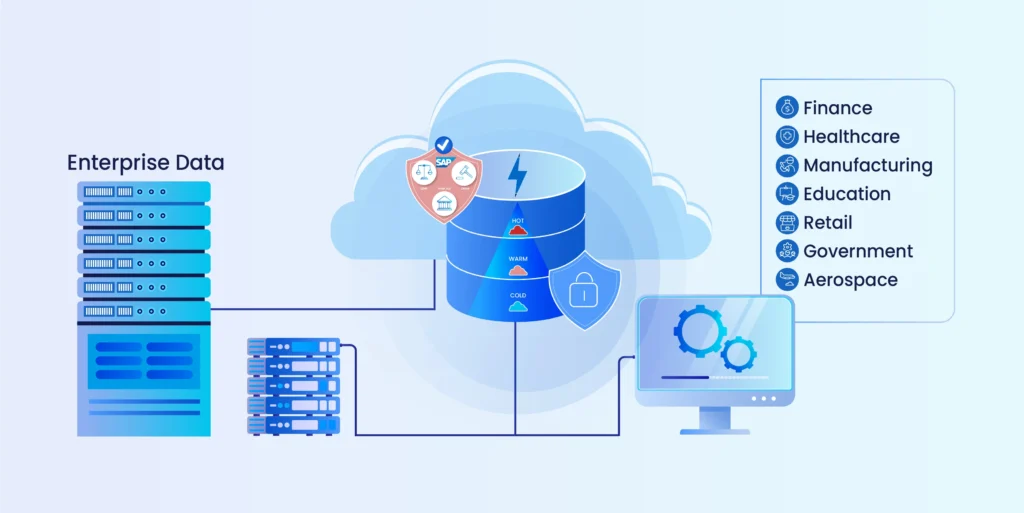

Key Takeaways
- Enterprise archiving differs from backup and native retention: it governs, classifies, and makes historical data legally defensible for the long term.
- Two disciplines apply in enterprise archiving: EIA covers emails and communications; EDA covers structured data from ERP, CRM, and legacy business applications.
- SOX, HIPAA, GDPR, and DPDPA mandate long-term, auditable retention. Non-compliance under GDPR alone can cost up to 4% of global annual revenue.
- First-gen archiving is database-centric and schema-bound. Lakehouse-based platforms like Archon ADS decouple historical data and support full legacy system decommissioning.
- The real cost of skipping enterprise archiving is the legacy system you cannot retire because compliant data access remains unproven.
- Archon ADS delivers cross-system search, legal hold, and WORM-compliant storage across 200-plus connectors, reducing storage costs by up to 80%.
Every enterprise eventually faces the same problem: where do we put the terabytes of old emails, chat logs, ERP records, and payroll histories that regulators still require us to keep?
The problem is only getting bigger. In 2024, the world created 149 zettabytes of data, and by 2025, that number will hit 181 zettabytes. Much of this isn’t disposable—financial records, patient data, employee communications, and system logs must be retained for 7–10 years or more under laws like GDPR, HIPAA, and SOX.
Ignoring this reality is risky. At the same time, keeping legacy systems online “just for access” drains your finances. For example, hospitals report archiving seven or more additional systems in the next three years because the cost of maintaining them outweighs their usability and resulting in growing data debt across the enterprise.
This is where enterprise archiving comes in. It is not just about cutting storage and licensing costs; it also ensures compliance, strengthens security, and makes historical data usable for audits, and business continuity.
In this guide, we’ll break down Enterprise Archiving: what it is, why it matters now more than ever, and how enterprises can build a strategy that’s both compliant and cost-effective.
What is Enterprise Archiving?
Enterprise archiving is the systematic, long-term retention of business-critical data in a way that keeps it compliant, searchable, and cost-efficient — without keeping the source system alive to access it.
It works across two distinct types of data:
- Structured data: ERP records, financial transactions, CRM data, payroll history, HR records, manufacturing logs
- Unstructured data: Emails, instant messages, contracts, documents, PDFs, collaboration platform content
Unlike storage, enterprise archiving doesn’t just hold data. It classifies it, applies retention policies to it, enforces legal holds on it, protects it against tampering, and makes it retrievable on demand. It’s built to hold up under regulatory scrutiny, not just to exist on a server somewhere.
A file stored on a drive is stored. An archived record is governed, immutable, and auditable. Those are not the same thing, and the gap between them is where compliance failures happen.
How Enterprise Archiving Differs from Backup and Storage
It’s common to confuse archiving with backup or storage, but the goals are very different:
| Function | Backup | Storage | Enterprise Archiving |
|---|---|---|---|
| Purpose | Disaster recovery, restore lost/corrupted files | Increase raw capacity for active workloads | Long-term retention of historical and compliance data |
| Time Horizon | Short-term (days/weeks) | Mid-term (active usage) | Long-term (years/decades) |
| Scope | Snapshots at a point in time | All active data | Only records that need to be preserved |
| Access | Restores the entire system or files | Fast access to live data | Indexed, searchable, compliance-ready |
| Cost | High (requires regular duplication) | Medium (adds capacity) | Optimized (tiered storage, decommissioning savings) |
| Compliance | Not designed for regulatory mandates | No retention policies | Built for legal, audit, and governance needs |
Enterprises looking to build a compliance-first, enterprise-wide archive can’t rely on backup or storage alone; they need purpose-built archiving platforms.
Enterprise Information Archiving vs. Enterprise Data Archiving: How Are They Different?
When companies talk about enterprise archiving, they’re usually talking about two different but complementary practices: Enterprise Information Archiving (EIA) and Enterprise Data Archiving (EDA). Although both matter, but for very different reasons.
What Is Enterprise Information Archiving (EIA)?
According to Gartner, Enterprise Information Archiving is the practice of preserving unstructured information and human communication records for compliance, legal, and audit purposes.
What it covers:
- Emails (Exchange, Gmail, etc.)
- Chat messages (Teams, Slack, Zoom, Webex)
- Social media posts (LinkedIn, Twitter/X, WhatsApp, etc.)
- Office documents, PDFs, and presentations
- Files from collaboration platforms like SharePoint or Google Workspace
The use cases are primarily legal and compliance-driven:
- eDiscovery: Producing a complete set of communications between specific individuals, in a specific time window, when litigation demands it
- Regulatory compliance: SEC 17a-4, MiFID II, and FCA mandates require financial institutions to preserve and produce electronic communications on demand
- Audit readiness: Demonstrating a complete, tamper-proof communication record at any point in time
What Is Enterprise Data Archiving (EDA)?
On the other hand, Enterprise Data Archiving focuses on structured and semi-structured data generated by business systems. Unlike EIA, which deals with people-to-people communications, EDA preserves the records created by enterprise applications.
What it covers:
- Databases (Oracle, SQL Server, PostgreSQL)
- ERP systems (SAP ECC, SAP S/4HANA, JD Edwards, PeopleSoft, Sage)
- CRM systems (Salesforce, Siebel)
- SharePoint (documents, lists, and records)
- Legacy applications being retired or decommissioned
The use cases are broader:
- Application decommissioning: Retiring a legacy PeopleSoft or SAP ECC instance without losing audit access to its historical records
- Migration support: Archiving ECC data before an S/4HANA migration to reduce the HANA footprint and accelerate the cutover
- Compliance and audit: Producing specific transaction records, payroll runs, or financial entries on demand without reactivating the source system
- Analytics: Running queries against historical data without burdening the production environment
EDA is where the cost argument is sharpest. The average legacy ERP carries a maintenance cost between $500,000 and $1.5 million per year. Most of that cost is being paid to preserve access to historical data that represents a fraction of the system’s total volume.
Archive that data properly. Retire the system. Stop paying the bill.

Why Enterprise Archiving Matters for Compliance and Governance
Regulators worldwide expect enterprises to retain records for 5–10+ years depending on the industry and enterprise archiving makes this possible by enforcing retention policies, legal holds, and audit trails.
Key Regulations That Demand Archiving
- GDPR (Europe) – Requires enterprises to demonstrate lawful storage and access control of personal data
- HIPAA (Healthcare, US) – Mandates safe and secure retention of patient records
- SOX (Sarbanes-Oxley, US) – Section 802 requires retention of audit records for at least 7 years
- SEC Rule 17a-4 & FINRA (Financial Services, US) – Requires brokers and dealers to preserve communications in tamper-proof WORM storage solution
- MHRA Clinical Trial Archiving (UK) – Retains the Trial Master File (TMF) and other essential documents for a specified period (for regulations like ICH GCP E6(R2))
- FOIA and Public Records Acts (Government) – Require agencies to maintain searchable, accessible archives of official communications and documents
- Manufacturing Quality Standards (ISO/industry-specific) – Mandatory to retain production and safety records for multiple years to ensure traceability
These are legal obligations. And the enforcement record is clear: regulators fine organizations not just for data breaches, but for the inability to produce records on demand.
GDPR penalties reach up to 4% of global annual revenue. SEC enforcement actions for records failures have resulted in nine-figure fines. HIPAA violations carry per-record penalties that compound quickly across large patient datasets.
The Real Cost of Not Archiving

The compliance fine is the visible cost. Three others rarely appear in board-level risk registers.
- Legacy system maintenance: Organizations keep applications running long past their operational life because the data inside them can’t be moved without losing compliance access. Every additional year of unnecessary maintenance on a legacy ERP is a direct cost that a proper archiving strategy eliminates.
- Audit response time: Without a cross-system archive, responding to a regulatory request means manual searches across fragmented systems, often by people who weren’t involved when the records were created. Weeks of response time at significant cost per hour. Proper enterprise archiving reduces that to hours.
- Legal hold failures: When litigation hold is managed inside the source system, there’s no independent verification that records weren’t altered between the hold being placed and the records being produced. That gap is a legal liability, not just an IT inconvenience.
Unsure whether your current setup would survive a regulatory audit? See what a governance-first archive looks like in practice.
What Industries Need Enterprise Archiving the Most
Archiving challenges aren’t one-size-fits-all. A bank, a hospital, and a SaaS company all face compliance and cost pressures, but the regulations, risks, and data types they manage couldn’t be more different. That’s why enterprise archiving strategies often need to be tailored by industry.
Healthcare: Protecting Patient Data and Meeting HIPAA
Healthcare generates vast volumes of clinical, financial, and operational records daily. Regulations like HIPAA in the US or GDPR in the EU require hospitals to retain patient data for years, often decades. Legacy EHR systems (Cerner, Meditech) make this difficult; they’re expensive to maintain and risky from a compliance perspective.
Archiving in healthcare enables:
- HIPAA-compliant, tamper-proof storage of patient health information
- Secure long-term retention of EHR data, imaging files, and billing records
- Faster audits and legal readiness with indexed, searchable archives
- Cost savings by retiring outdated clinical applications while keeping historical data accessible
BFSI (Banking, Financial Services, Insurance)
Financial institutions are under some of the strictest retention laws in the world. SOX, SEC 17a-4, PCI-DSS, and RBI mandates require financial records to be stored securely for 7–10+ years in immutable formats. Yet, many banks still run on COBOL- and AS400-era systems, creating spiraling costs and security risks.
Archiving in BFSI delivers:
- Immutable WORM storage that passes regulatory scrutiny
- 80% faster migration out of legacy systems without business disruption
- Audit-ready access to loan books, GL entries, KYC data, and tax filings
- Lower risk premiums as cyber liability insurers reward strong archival security
Government: Transparency and Long-Term Public Record Retention
Governments must balance transparency with security. From FOIA (US) and RTI (India) to NARA and GDPR, agencies face strict mandates to preserve public records while protecting citizen data. Yet many still run on outdated, siloed platforms.
Archiving for government facilitates:
- Centralized, secure repositories for public records and citizen data
- Compliance with FOIA, GDPR, NARA, and other archival mandates
- Cost-efficient retirement of decades-old mainframe and ERP systems
- Long-term accessibility for audits, legal cases, and public requests
Manufacturing: Retiring Old ERPs and Quality Systems
Manufacturers produce massive volumes of operational and compliance data: production logs, quality records, safety certifications, and ERP outputs. Many are trapped in outdated JD Edwards or SAP systems that need archiving which drive up cost and block scalability.
Archiving in manufacturing allows:
- Safe extraction and archival of legacy ERP and quality data
- Preservation of ISO and safety compliance records
- Lower costs by consolidating fragmented, siloed systems into one archive
- Improved collaboration and analytics by unlocking historical production data
SaaS & CRM Platforms
Modern enterprises run much of their business on SaaS applications like Salesforce, ServiceNow, and Workday. These platforms aren’t built for long-term retention — data limits, performance concerns, and high storage costs make archiving essential.
Archiving SaaS data enables:
- Compliance with retention laws (GDPR, CCPA, industry-specific)
- Offloading old CRM data (contacts, deals, activity logs) into a low-cost, searchable archive
- Improved Salesforce performance by decluttering production environments
- Ensuring audit and analytics teams can still access customer history without bloating SaaS platforms
Start your Enterprise Archiving Journey Today
How Every Department Benefits from Enterprise Archiving
Enterprise archiving isn’t just an IT concern. Different departments depend on long-term access to historical records for their own compliance, operational, and strategic needs. A department-specific view highlights how archiving delivers value across the business.
HR & Payroll Archiving
- Retain employee lifecycle data (contracts, pay slips, performance records)
- Meet labor law retention requirements (7–10 years in many regions)
- Provide audit-ready access to payroll or benefits history without bloating HCM systems like SuccessFactors or Workday
Data Archiving for Finance
- Archive financial statements, GL entries, and tax filings
- Comply with SOX, IFRS, RBI, SEC, and regional audit laws
- Reduce dependency on legacy ERP systems (SAP ECC, JD Edwards, PeopleSoft) while keeping financial data accessible for audits and M&A due diligence
Legal Data Archiving
- Secure, immutable archives for contracts, litigation records, and communications
- Support legal holds, eDiscovery, and defensible deletion
- Mitigate regulatory fines by ensuring historical records are complete, accessible, and tamper-proof
Sales & Customer Success
- Offload old CRM data (Salesforce, Siebel) to prevent system bloat
- Maintain full customer history for disputes, renewals, or upsell opportunities
- Improve performance of production SaaS systems by decluttering inactive records
Data Archiving for Marketing
- Retain campaign performance data, lead records, and consent information for CCPA/GDPR compliance
- Archive digital assets (emails, landing pages, social campaigns) for brand governance and audit
- Enable long-term analytics by keeping historical campaign data accessible for attribution and trend analysis
IT & Security
- Reduce storage and backup costs by archiving inactive data to cold tiers
- Retire legacy applications without losing historical records
- Improve cyber resilience with immutable storage that protects against ransomware and accidental deletion
Read more: A complete guide to data archiving strategies and fundamentals
Enterprise-Wide Archive vs. Departmental Archiving
Many organizations begin with departmental archiving: a solution for HR records here, an email archive there, a database snapshot somewhere else. It’s understandable. It’s also how you end up with five disconnected archives, five separate governance models, and no single view of what you’ve retained or why.
Enterprise-wide archiving consolidates this under one platform, one policy framework, one search interface, and one audit trail. When a regulator asks for “all records related to this employee between 2018 and 2022,” that request goes to one place — not five.
The compliance case for consolidation is equally clear. Fragmented archives create fragmented audit trails and make it more difficult to maintain a defensible data chain of custody, compared to a single governed archive with consistent controls throughout.
Organizations pursuing centralised data archiving to lower compliance costs consistently report reductions in both storage overhead and the time spent responding to audit and legal requests.
Enterprise Archiving Strategies
The right enterprise archiving strategy depends on how often the business needs access to the data, what regulatory environment it operates in, and how much budget can be allocated to storage.
Active vs. Cold vs. Hybrid Archiving

Active Archiving
Active archiving keeps data online, indexed, and ready for fast retrieval. Think of it as the “always accessible” tier of an archive, particularly important for industries like financial services and healthcare where regulators or auditors might request communication logs or patient records on short notice. Because it relies on higher-performance storage, active archiving costs more, but it reduces turnaround time from days to minutes.
Cold Archiving
Cold archiving, by contrast, prioritizes cost savings. Records are pushed into slower, cheaper storage such as tape libraries or deep cloud archive tiers. Retrieval can take hours or even days, which makes it less useful for high-frequency audit needs. But it is ideal for old payroll records, expired contracts, or historical logs that must be retained just for the compliance purposes but are rarely touched.
Hybrid Archiving
Hybrid archiving combines both automated, policy-driven tiering that moves data from active to cold storage based on age, access frequency, and retention classification. This is where the 60–80% storage cost reduction comes from, and it’s the approach most enterprise archiving deployments use.
The keyword is automated. Manual tiering decisions are inconsistent, undocumented, and indefensible under audit. If a human is deciding case by case what moves to cold storage, it’s not a strategy.
Solutions & Architectures: On-Prem vs. Cloud vs. Hybrid
Enterprises also need to decide where their archive will live.
On-Premise Architecture
On-premises archives give organizations maximum control over infrastructure and data security. This is often the default for industries bound by tight data governance rules, such as government and defense. The trade-off here is the high upfront costs and ongoing hardware maintenance.
Cloud Architecture
Cloud archiving has become increasingly attractive and all thanks to its scalability and pay-as-you-go pricing. Major vendors now offer immutable blob storage options specifically for compliance workloads. Cloud archiving also simplifies system retirement by letting organizations offload legacy data without managing additional servers.
Hybrid Architecture
Most enterprises end up with a hybrid architecture. Sensitive or regulated workloads may remain on-premises, while less sensitive, long-term data moves to the cloud for cost savings. Hybrid deployment also allows for gradual migration rather than a disruptive “big bang” shift.
On-Premises, Cloud, and Hybrid Architecture
| Architecture | Best For | Trade-offs |
|---|---|---|
| On-premises | Highly regulated environments with strict data sovereignty requirements. | High infrastructure cost; limited scalability. |
| Cloud | Organizations prioritizing scalability and reduced infrastructure overhead. | Data residency considerations; ongoing cloud costs. |
| Hybrid | Enterprises with mixed data sensitivity and existing on-premises investments. | Requires consistent governance across both environments. |
Most enterprise archiving deployments today are hybrid. On-premises for the most sensitive or regulated data; cloud for everything else.
Immutable Archiving and Evidentiary Integrity
Immutability is not a feature. It’s the baseline requirement for any archive that needs to be held under legal or regulatory scrutiny.
An immutable archive means records cannot be altered, overwritten, or deleted outside the defined retention policy. This is enforced through:
- WORM (Write Once, Read Many) storage: Once written, a record cannot be modified
- Append-only logs: Every access and modification event is recorded and cannot be retroactively altered
- Cryptographic hashing: Each record carries a hash at ingestion; any subsequent alteration changes the hash, making tampering immediately detectable
- Trusted timestamps and ledger anchoring: Records are timestamped at ingestion in a way that can be independently verified
These capabilities are what separate a genuine enterprise archive from a storage location with a retention policy bolted on. They’re also what align enterprise archiving with evidentiary standards like eIDAS and the requirements for certified archives in financial and legal contexts.
The Enterprise Archiving Process: Implementation Roadmap
Most failed archiving projects don’t fail because of technology. They fail because the organization didn’t define what needed archiving, under which policies, before moving data.
1. Assess What Needs Archiving
Map your data landscape before touching anything. Identify which systems hold data with retention obligations, what the obligation is for each data type, and how long the source system is expected to remain operational. This is also where you identify decommissioning candidates: the systems you’re currently paying to run primarily for historical data access.
2. Define Retention Policies and Legal Hold Requirements
Retention policy should be built from regulatory requirements outward, not from what IT finds convenient. Map each data type to its governing regulation, define the retention period, and define what triggers retention and what triggers deletion.
Legal hold requirements need separate documentation: which data types are subject to hold, what process governs hold placement and release, and how hold status is tracked independently of the source system.
3. Design the Archive Architecture
Choose between on-premises, cloud, and hybrid deployment. Define the tiering strategy. Decide whether your archiving platform handles structured data, unstructured data, or both. If you’re decommissioning applications as part of the project, the architecture must support independent retrieval from the archive without the source system.
4. Implement the Archiving Platform
Once the strategy is defined, organizations execute it by selecting the right enterprise archiving software. Ingest data from source systems using pre-built connectors. Apply metadata tagging, retention classification, and legal hold flags at ingestion. Validate that immutability controls are active and that the audit trail captures all access events from day one.
5. Monitor, Optimize, and Govern Ongoing
An archive is not a project with an end date. Retention policies change as regulations change. New data sources need to be added. Legal hold status requires active management. The platform needs periodic audits to confirm policies are being enforced as configured.
Further Read: For detailed guidance on execution, the data archiving best practices guide covers policy design, metadata governance, and ongoing operations in depth.
How to Measure ROI from Enterprise Archiving
ROI from enterprise archiving doesn’t show up as revenue. It shows up as cost eliminated, risk removed, and time recovered.
Three categories are worth quantifying before any platform evaluation.
Legacy system cost elimination
Calculate the fully loaded annual cost of each system targeted for decommissioning: licensing, maintenance contracts, infrastructure, and internal support hours. The average legacy ERP runs between $500,000 and $1.5 million per year in total maintenance spend. A proper archiving strategy makes decommissioning possible and eliminates that cost permanently.
Storage cost reduction
Active-tier storage is expensive. Historical data that moves to a governed cold tier at a fraction of the cost represents direct, recurring savings. Archon customers typically report 60–80% reductions in storage costs following archival migration.
Audit and legal response time
Responding to a regulatory request manually across fragmented systems can cost tens of thousands of dollars in internal and external hours. Cross-system archive search that returns verified results in minutes rather than weeks eliminates most of that cost and eliminates the risk of an incomplete or inaccurate response.
How Enterprise Archiving Software Helps
The real power of enterprise archiving doesn’t come from simply moving old data into cheaper storage. It comes from the software layer that makes archives secure, searchable, compliant, and cost-effective.
Here are some prominent benefits of enterprise archiving software:
Unified Data Management
Archiving software can ingest both structured data and unstructured content. By consolidating everything into a single archive, organizations avoid silos and gain one consistent source of truth for compliance, audit, and analytics.
Compliance and Governance Built-In
Instead of relying on manual retention tracking, archiving software automates it. Policies can be configured once and applied consistently across the enterprise. Features like legal hold, tamper-proof audit logs, and immutable storage make archives legally defensible in audits or court.
Secure, Immutable Storage
Modern solutions offer WORM options and encryption both in transit and at rest. Some platforms even add blockchain-based immutability for extra assurance. This ensures records can’t be altered, deleted, or tampered with, reducing risks of fraud or non-compliance penalties.
Search and Discovery
Archiving isn’t useful if you can’t find what you need. Enterprise archiving software indexes every record, making it possible to run granular searches across millions of documents or transactions. This shortens audit response times from weeks to minutes and accelerates internal investigations, eDiscovery, or HR queries.
Cost Optimization Through Tiering
By automatically shifting inactive data into lower-cost storage tiers, archiving software helps enterprises cut costs by 60–80% on primary storage and backup infrastructure. Smart compression and deduplication reduce the footprint further, freeing IT budgets for modernization projects.
Intelligence and Analytics
Some platforms now embed AI/ML capabilities to classify sensitive data, detect anomalies in archived communications, and enrich unstructured content with metadata. Instead of being a passive vault, the archive becomes an active data asset.
Get Enterprise Archiving Software Today.
Leading Enterprise Archiving Solutions
Not all archiving platforms address the same problem. The differences are architectural, not cosmetic, and they reflect fundamentally different decisions about where data lives, how it’s governed, and whether the source system can be retired.
Here’s an honest read.
| Capability | Native Retention | First-Gen Archiving | Lakehouse Archiving (Archon) |
|---|---|---|---|
| Decommissioning Ready | No (Source dependent) | Partial | Yes |
| Data Types | Structured only | Primarily structured | Structured + Unstructured |
| Connectors / Sources | Native app only | Limited | 200-plus |
| Retention Policy | Parameter-based, per module | Centralized but rigid | Policy-driven, cross-system |
| Immutability / WORM | Not guaranteed | Vendor-controlled | Cryptographic hash, append-only |
| Cross-system Search | No | Within platform only | Across all archived sources |
| Evidentiary Integrity | No | Limited | Trusted timestamps, ledger anchoring |
| AI-Ready Analytics | No | No | Yes |
| Vendor Lock-in | High | High | Low — Open Formats |
| Storage Cost Reduction | Minimal | Moderate | 60–80% |
1. Archon Data Store
Archon Data Store™ (ADS) is a Lakehouse-based enterprise archiving platform built for structured and unstructured data across source applications. It handles the full lifecycle: ingestion via 200-plus pre-built connectors, transformation across 1,000-plus built-in operations, policy-driven retention, WORM-compliant immutable storage, cross-system search, legal hold orchestration, and analytics on archived data.
The architecture decouples historical data from the source system entirely. Source applications can be decommissioned without losing compliant access to their records. Data is stored in open formats, which eliminates vendor lock-in and ensures long-term retrievability independent of any single platform.
Key features of Archon Data Store:
- Application-aware archiving → native connectors for SAP, PeopleSoft, JD Edwards, Salesforce, and more
- Compliance by design → retention enforcement, WORM storage, immutable audit logs, and alignment with global mandates (GDPR, HIPAA, DPDPA, SOX, PDPL, SEC 17a-4, PDPA, DIFC)
- Cost-optimized architecture → tiered storage (hot, warm, cold) with compression and deduplication
- AI-enriched search → metadata indexing and intelligent discovery across structured and unstructured content
- Faster time-to-value → deployments designed for quick decommissioning of legacy apps without disrupting daily operations
Archon is purpose-built for organisations running SAP ECC decommissioning and S/4HANA migrations, Workday and PeopleSoft payroll transitions, healthcare EHR consolidations, and multi-system application decommissioning programmes.
Want to see Archon in action?
2. Arctera Enterprise Vault
Arctera Enterprise Vault (formerly Veritas) is a mature EIA platform with strong email and communications archiving capabilities. It handles large volumes of unstructured communication data well and has a long track record in financial services and legal sectors.
Its limitations show in structured data and EDA use cases. It wasn’t architected for application decommissioning, ERP data archiving, or cross-application governance in complex SAP or Oracle environments. If your archiving need is primarily EIA, it’s a credible option. If EDA is in scope, it’s the wrong tool.
3. OpenText InfoArchive
OpenText InfoArchive addresses both structured and unstructured data and has broad enterprise coverage. It carries a strong pedigree in legacy application decommissioning.
The trade-offs are complexity and cost. OpenText deployments are typically heavyweight and expensive to implement and operate at scale. The proprietary data model creates long-term lock-in that complicates future migrations. Retrieval performance at high volume can also be a consideration for organizations with frequent audit or legal hold requests.
4. IBM Information Lifecycle Governance (ILG)
IBM ILG is an enterprise-grade platform with deep integration into IBM infrastructure. It handles structured data governance and retention at scale and suits organizations already running a significant IBM ecosystem.
Outside that ecosystem, the case is harder to make. Integration overhead in heterogeneous environments — mixed SAP, Oracle, Salesforce, and Workday — is significant, and the platform’s strengths depend heavily on IBM infrastructure being in place.
Future of Enterprise Archiving: AI-Powered Archiving
Traditional archives were little more than cold storage. Data was safe, but hard to search, and rarely used unless an auditor came knocking.
Modern enterprise archiving platforms change that by embedding artificial intelligence (AI) and machine learning (ML) to make archives smarter, faster, and more valuable. Artificial intelligence is changing what it means to “archive.”
- Intelligent Classification: AI auto-detects sensitive data (PII, PHI, financial records) and applies policies, eliminating manual tagging.
- Metadata Enrichment: ML adds context to unstructured files, making archives instantly searchable.
- Automated Compliance: AI flags anomalies — from suspicious communications to unusual transfers — turning archives into compliance watchdogs.
- Smarter Discovery: Natural language search and proactive document suggestions cut investigation time.
- Predictive Retention: AI predicts when to shift data tiers or extend retention for legal cases, reducing risk.
- Business Insights: Enriched archives power analytics for Marketing, HR, and Finance, turning history into strategy.
Archon: Compliance-First, Cost-Optimized Archiving
With data volumes doubling every four years and regulations becoming more unforgiving, organizations can’t afford fragmented or outdated approaches. Both Enterprise Information Archiving (EIA) and Enterprise Data Archiving (EDA) are essential, yet most vendors only specialize in one or the other. That leaves enterprises juggling multiple tools, inconsistent compliance coverage, and higher costs.
Archon Suite solves this gap.
Unlike niche platforms, Archon provides a compliance-first, application-aware archive that unifies structured and unstructured data. Whether it’s emails, chat logs, or ERP databases, Archon consolidates everything into a single, secure, and searchable archive.

Case in point:
When consumer privacy laws like CCPA came into force, Best Buy faced a huge challenge: ensuring compliance across 400+ core systems holding millions of customer records. These systems weren’t designed for complex analytics or retention enforcement.
Working with Best Buy’s IT and compliance teams, Platform 3 Solutions deployed Archon to establish an automated, topic-based archiving process. This framework allowed Best Buy to perform defensible deletion of personal data while retaining what was legally required. This ensured full compliance with CCPA data retention and other privacy mandates.
Ready to move beyond siloed archives and costly legacy systems?
Talk to our team about how Archon Data Store™ can help you unify EIA + EDA in one compliance-first, cost-optimized platform.
Frequently Asked Questions
The three common methods are:
Active archiving – data remains online and quickly accessible.
Cold or deep archiving – data is moved to lower-cost, slower storage tiers.
Hybrid archiving – combines both keeping frequently used data active and the rest in cold storage.
Key benefits include:
• Compliance with regulations like GDPR, HIPAA, SOX.
• Lower IT costs from reduced storage and retired legacy systems.
• Faster audit, eDiscovery, and legal responses.
• Enhanced security with tamper-proof, immutable storage.
• Long-term access to historical data for analytics and business insights.


